An AirTag battery lasts for around a year in most cases. As per Apple, the 2nd-generation AirTag has a life of more than a year. But frequent sound alerts and long Precision Finding sessions can shorten the battery life, so keep checking Find My on a regular basis.
AirTag Battery Guide 2026: Life, Charging, and Replacement

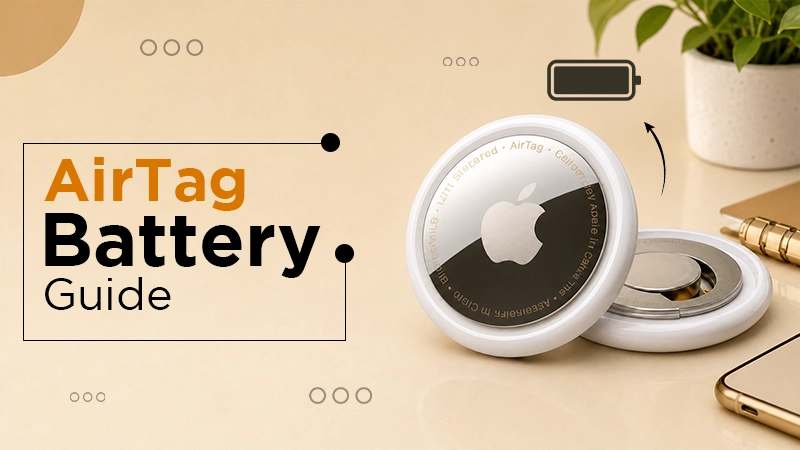
An AirTag battery is a CR2032 lithium 3V coin cell that can last up to one year. It is not rechargeable, so you have to replace it with a new one when it shows a low battery alert.
In this guide, you will know everything about AirTag battery life, quality battery types, steps to replace it, AirTag on Android, and solutions to problems after a battery change.
Our Hands-On Take
We have been using the AirTags for everyday tracking, and the battery has been quite convenient. The CR2032 battery usually lasts for about a year, so you need not change it over and over again. Whenever Find My shows a low-battery alert, we just replace the battery and continue using the AirTag without much hassle.
Table of Contents:
- What Type of AirTag Battery Does It Use?
- Do AirTags Need to Be Charged?
- How Long Does an AirTag Battery Last?
- AirTag 1st Gen vs. 2nd Gen: Battery Comparison
- How to Check AirTag Battery Level?
- How to Replace AirTag Battery: Step-by-Step
- Which CR2032 Batteries Work in AirTags?
- Can You Use AirTag for Android?
- Ways to Extend AirTag Battery Life
- Quick Fixes When AirTag Is Not Working After Battery Change
- Dos and Don'ts for AirTag Batteries
- Conclusion
- FAQs
What Type of AirTag Battery Does It Use?
An AirTag battery uses one CR2032 lithium 3V coin battery. It’s officially confirmed on Apple’s support page and in the technical specifications for both generations of AirTag. The code CR2032 indicates the following:
- “CR” refers to lithium chemistry
- “20” represents a 20 mm diameter
- “32” indicates the thickness
The details of the battery at a glance:
| Detail | Specification |
| Battery type | CR2032 coin cell |
| Chemistry | Lithium |
| Included in box | Yes, pre-installed |
| Rechargeable | No |
| User-replaceable | Yes |
| Voltage | 3V |
Do AirTags Need to Be Charged?
No, you need not charge AirTags. They don’t have a charging port, wireless charging system, or rechargeable battery inside. The same goes for the AirTag2, which uses a replaceable CR2032 battery. Whenever your battery gives a low battery alert, just replace the AirTag battery instead of charging it. Unlike a portable charger that supplies power to compatible electronic devices, an AirTag relies on its replaceable coin-cell battery. You cannot recharge it by connecting it to a power bank or charging cable.
If you are looking for how to charge an AirTag, stop doing that, as you can’t do that. Apple specifies only CR2032, so skip rechargeable coin cells.
How Long Does an AirTag Battery Last?
An AirTag battery usually lasts about one year under normal usage. Apple says that the 2nd-generation AirTag lasts for more than a year on a standard battery. This is based on December 2025 tests using everyday average use of playing sound and Precision Finding, so the actual battery life depends on how often you ring or track the tag.
These factors decide how long your AirTag battery lasts:
| Factor | Effect on Battery |
| Extreme cold or extreme heat | Shortens battery life |
| Frequently playing sound | Battery drains faster |
| Infrequent use of Tag | Helps Last longer |
| Regular Precision Finding | Uses more power |
If you’re also comparing the battery performance of other Apple devices, you can explore our iPhone 18 review for information about smartphone features and everyday usage.
AirTag 1st Gen vs. 2nd Gen: Battery Comparison
Both AirTag generations use the same CR2032 battery, so you can use the same battery for either generation. Apple launched the 2nd-generation AirTag in January 2026 with a newer Ultra Wideband chip, a louder speaker, and a longer Precision Finding range. However, the battery design was kept unchanged.
Here is the table showing the differences between AirTag 1st Gen and 2nd Gen:
| Feature | AirTag (1st Gen) | AirTag (2nd Gen) |
| Battery | CR2032 | CR2032 |
| Battery life | About 1 year | More than 1 year |
| Precision Finding | Standard range | Up to 1.5x range |
| Price | $29 | $29 |
| Rechargeable | No | No |
| Released | Apr-21 | Jan-26 |
| Water resistance | IP67 | IP67 |
| Weight | 11 g | 11.8 g |
Tip: To differentiate between the two, check the back. The 2nd gen has its details in capital letters and mentions the IP67 rating.
For readers deciding whether to upgrade their Apple devices, our iPhone 18 Pro vs. iPhone 17 Pro comparison offers another look at the differences between generations of Apple hardware.
How to Check AirTag Battery Level?
You can view your Apple AirTag battery through the Find My app on your iPhone or iPad. Your iPhone will automatically send you a low battery notification when the battery is low.
Follow the steps below to check the status:
- Open the Find My app.

- Select the Items tab from the bottom.
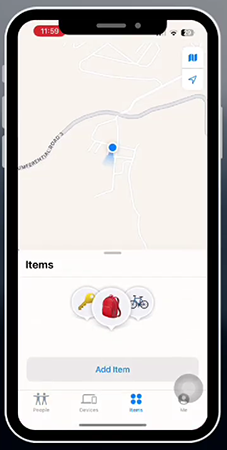
- Choose the AirTag you want to view.
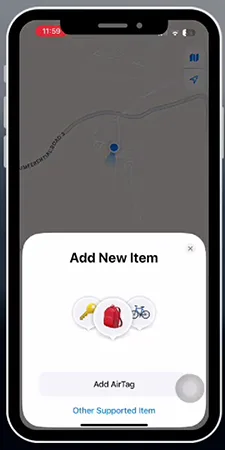
- Look for “Low Battery” below the AirTag’s name.
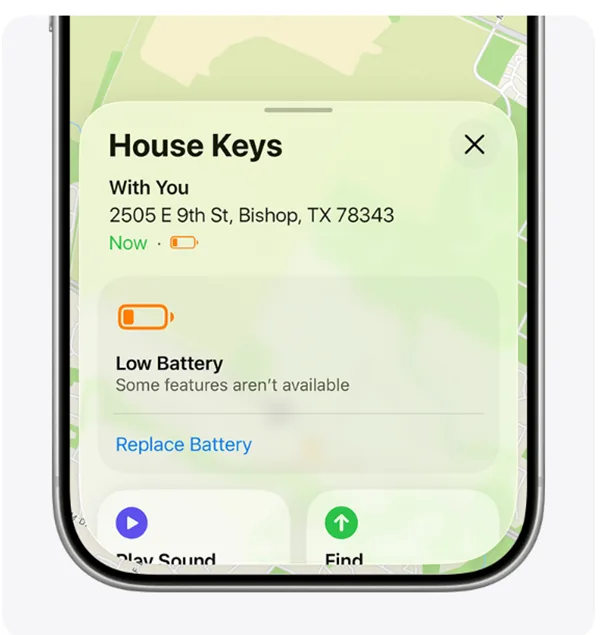
You can also explore our guide to Siri commands to learn more about using Apple’s voice assistant for everyday tasks on compatible devices.
Note: iPhone shows an alert if the AirTag battery is low.
How to Replace AirTag Battery: Step-by-Step
To replace the AirTag battery, simply remove the back cover, take out the old CR2032, and insert a new one. You don’t need any tools to do it. Here are simple steps from Apple’s official page mentioned below:
- Press down on the steel cover and twist counterclockwise until it stops.
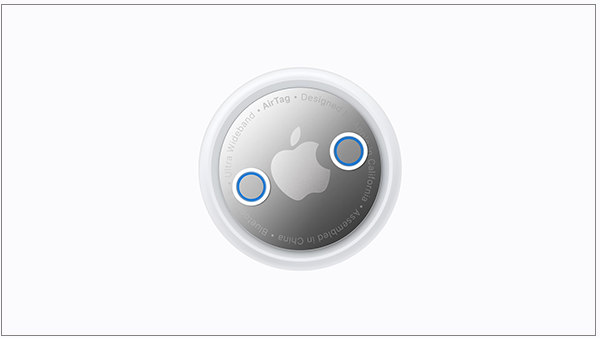
- Remove the back cover and take the old battery out.
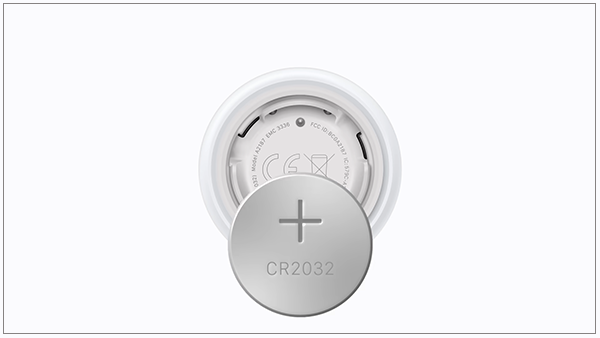
- Place a new CR2032 with the positive (+) side facing upward. This is the side with printed text.
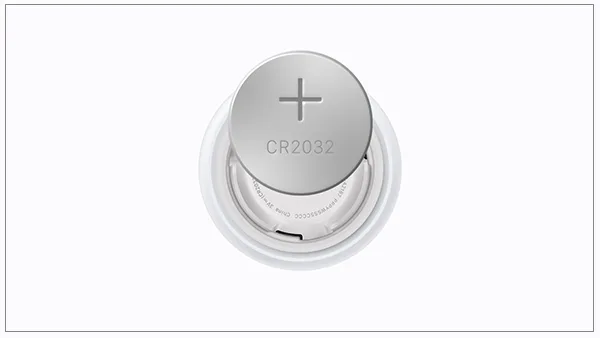
- Listen for the confirmation sound when the battery is connected.
- Line up the three tabs on the cover with the three slots on the AirTag.
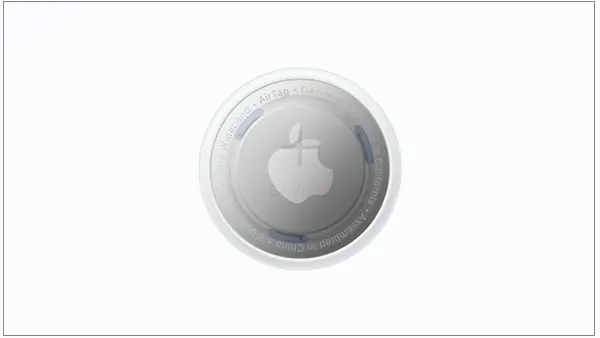
- Twist the cover clockwise until the cover closes properly.
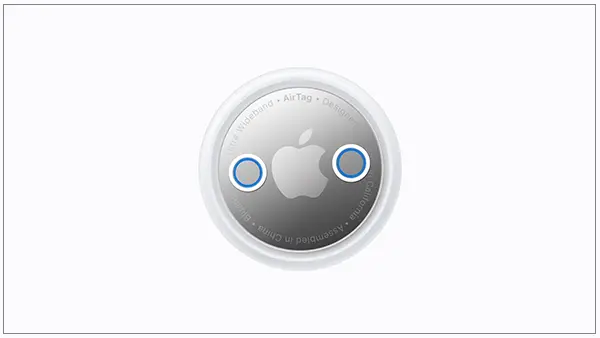
Safety Warning: Coin batteries can be fatal; they may cause serious injuries or even death if swallowed. Keep both new and used cells away from kids. Dispose of the old ones at a suitable drop-off point.
Which CR2032 Batteries Work in AirTags?
Most standard CR2032 batteries work, but certain batteries with a bitter coating may not work properly. Some manufacturers add a bitterant to prevent children from swallowing coin cells. Apple says that certain coated cells might not work with AirTag.
Thus, you had better use this quick guide before buying one;
- Works: Standard uncoated CR2032 cells from reputable brands.
- Works: Coated cells labeled “Compatible with Apple AirTag.”
- Avoid: Coated cells without an AirTag compatibility label.
- Avoid: Expired, damaged, or batteries from unknown brands.
Can You Use AirTag for Android?
No, AirTag can’t be used with an Android phone. AirTag requires an iPhone or iPad linked to an Apple Account, while the 2nd-gen model requires iOS 26 or later. However, Android users can detect unknown AirTags for safety. Here is what works on Android:
- Tracker Detect app: Apple’s free Google Play app can scan for AirTags separated from their owner. If an unknown AirTag travels with you for around 10 minutes, you can play its sound and follow the steps to remove the battery.
- Built-in alerts: Android has unknown tracker alerts since 2023.
- Battery status: Android devices can’t show an AirTag’s battery level.
Ways to Extend AirTag Battery Life
Use sound and Precision Finding only when necessary, and keep the tag within the recommended temperature range. These habits will give your battery a longer life:
- Use the sound only when you actually need it.
- Limit Precision Finding to short searches. Avoid using it too often.
- Avoid unnecessary movements through the Find My network for your battery’s long life.
- Keep the tag between −20° and 60° C (−4° to 140° F) as per Apple’s recommended range.
- Choose fresh batteries.
Quick Fixes When AirTag Is Not Working After Battery Change
If your AirTag does not respond after a battery swap, it could be due to the direction of the battery or the coating. Try the following solutions:
- No sound: Ensure that the positive side is facing upward and the battery is pressed down firmly.
- Coated battery: Use an uncoated CR2032 instead, or one that is labeled AirTag compatible.
- Cover won’t close: Make sure that the three tabs are aligned with the three slots, then twist the cover.
- Low battery is still there: Keep the AirTag close to your iPhone so that Find My can refresh.
- AirTag is still offline: Follow Apple’s reset instructions or contact Apple Support for assistance, if needed.
Dos and Don’ts for AirTag Batteries
Given below are the dos and don’ts you can follow to ensure that your Apple AirTag battery is safe and working properly.
Dos:
- Use a CR2032 lithium 3V coin battery.
- Change the battery soon if you get a low battery alert.
- Keep an extra CR2032 battery available at home.
- Dispose of old batteries appropriately.
Don’ts:
- Do not try to charge an AirTag or use rechargeable coin cells.
- Never use coated batteries without confirming AirTag compatibility from the label.
- Do not leave loose coin cells within reach of kids or pets.
Conclusion
The AirTag battery is simply replaceable with a CR2032 cell without any charging. It has a life of about one year. You can bank on it for day-to-day tracking. When Find My shows a low-battery alert, just open the AirTag and replace the old cell with a CR2032. Now you will be able to continue tracking your belongings as usual.
FAQs
Q1) How long does the AirTag battery last?
Q2) Do you have to charge AirTags?
No, you need not charge AirTags. They have no charging port, which renders them non-rechargeable. You get alerts on your iPhone when the charge runs low and replace the CR2032 coin cell yourself in less than a minute with no tools required.
Q3) Can I use a Duracell battery in my AirTag?
Yes, you can, provided it is AirTag compatible. Some Duracell CR2032 cells have a bitter coating that can prevent them from functioning. So, look for batteries marked “Compatible with Apple AirTag” on the packaging, which Apple suggests as a suitable choice for home use.
Q4) Does the new AirTag 2 have a rechargeable battery?
No, the latest 2nd generation AirTag, introduced in January 2026, does not have a rechargeable battery. It continues to use a replaceable CR2032 coin battery. Although Apple improved features like the Ultra Wideband Chip, speaker, and Precision Finding range, the coin battery design was kept the same as the previous model.
Q5) Can I check the AirTag battery on Android?
No. Android phones are not AirTag-compatible; that is why they are not able to show battery status. You need an iPhone or iPad with the Find My app to check the status of the battery. However, Android users can scan for nearby unknown AirTags for safety.
Q6) What happens if my AirTag battery dies completely?
If your battery has run out, it will stop sending signals, so Find My will display only its last recorded location. It won’t play sounds or use Precision Finding. Inserting a new CR2032 battery will allow you to reconnect to your Apple Account.
Sources:
How to replace the battery in your AirTag by Apple Support
AirTag (2nd generation) – Tech Specs by Apple Support
Do Apple AirTags Need to be Charged? by Otterbox
How Long Do AirTags Last? By Ugreen
TRENDING POST

Best Gaming Keyboard 2026: 7 Top Picks With Full Specs
AirTag Battery Guide 2026: Life, Charging, and Replacement
Siri Commands in 2026: Full List of iPhone Voice Commands