“Best” depends on your company size and industry, but the leading names are Jobber, Microsoft Dynamics 365, Salesforce Field Service, and FieldTask.
FieldTask Review: Is It the Best Field Service App for GoHighLevel?

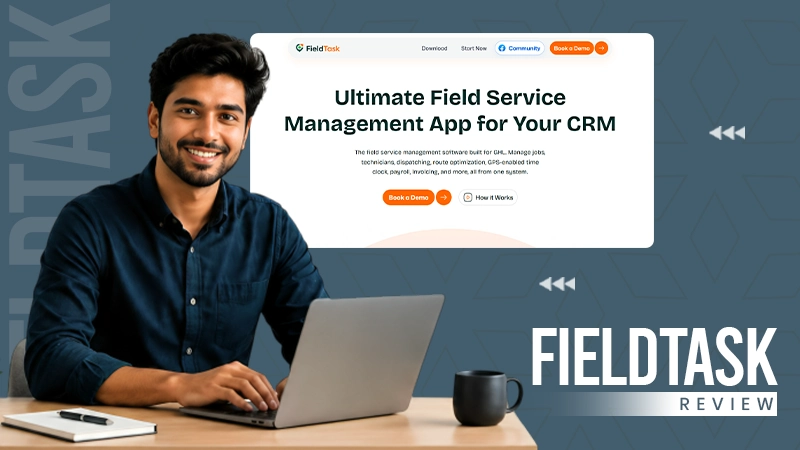

GoHighLevel is a fine platform for automating customer-facing operations. But many home service providers need more than that, like scheduling, technician and time tracking, and route planning.
Don’t worry, FieldTask is here to rescue.
FieldTask is designed to integrate with GoHighLevel, giving you a complete field service management system.
If you need one and are already a part of the GoHighLevel ecosystem, FieldTask is a no-brainer.
Table of Contents:
- What Is FieldTask?
- Why Do GoHighLevel Users Need a Field Service App?
- How FieldTask and GoHighLevel Work Together
- FieldTask Integration With GoHighLevel
- FieldTask Review: Key Features
- FieldTask vs Traditional Field Service Software
- Who Should Use FieldTask?
- Is FieldTask the Best Field Service App for GoHighLevel?
- Final Verdict
- FAQs
What Is FieldTask?
FieldTask is a field service management app built for businesses using GoHighLevel.
It focuses on the operational side of service businesses.
While GoHighLevel manages leads, customers, conversations, and automation, FieldTask manages how the job actually gets completed in the real world.
The platform is built around workflows such as:
Lead → Booking → Dispatch → Technician → Job Completion → Invoice → Payment
It’s simple: GoHighLevel handles the customer relationship.
FieldTask handles the field workforce, such as home service contractors.
This makes it useful for businesses such as:
- HVAC firms
- Plumbing companies
- Electrical contractors
- Cleaning services
- Roofing companies
- Landscaping companies
- Property maintenance services
- Installation services
Why Do GoHighLevel Users Need a Field Service App?
GoHighLevel is excellent at managing customer-facing operations like:
- Lead generation
- CRM
- Sales
- Forms
- Calendars
- Customer communication (SMS and Emails)
- Reviews
- Follow-ups
However, running service operations also involves answering questions like:
- Which technician should receive the job?
- Where is the field crew currently located?
- Has the serviceman arrived?
- How long did the job take?
- Were work photos collected?
- How many hours should be registered as payroll?
These questions are not marketing problems.
They are field management problems.
FieldTask adds those field service capabilities directly to the HighLevel workflow.
How FieldTask and GoHighLevel Work Together
The biggest advantage of the platform is the way it fits into the existing HighLevel domain.
The relationship is straightforward:
GoHighLevel manages customers:
- Lead capture
- Customer records
- Sales opportunities
- Appointment booking
- Automated communication
- Estimate follow-up
- Payments
- Reviews
FieldTask handles field operations.
- Dispatch
- Scheduling
- Technician job
- Route planning
- Route optimization
- GPS tracking
- Geofencing
- Jobsite photos
- Job photos
- Timesheets
- Payroll calculation
The connected system saves teams from managing separate software for sales and operations.
FieldTask Integration With GoHighLevel
Businesses using multiple software know how complex it gets. Using one platform for CRM, another for scheduling, another for GPS tracking, and another for payroll.
The result is duplicate data and manual updates.
FieldTask is different, as it’s designed as a native field service management solution for HighLevel. Customer data, appointments, jobs, invoices, and other operational information can sync between both systems.
No complicated workflows just to move information between platforms.
The goal is a single connected workflow.
FieldTask Review: Key Features
It’s a good service operations app that solves daily operational problems that mobile service teams usually struggle with.
Dispatch Management
Dispatching is one of the most important parts of field service, as it assigns the right technician at the right time.
FieldTask helps businesses organize jobs and assign work to field employees.
No need for constant phone calls and manual coordination.
For companies with multiple technicians, structured dispatch becomes more important as the number of daily jobs increases.
Scheduling for Field Teams
Customer scheduling and field scheduling don’t always mean the same thing.
A customer may book a preferred appointment time.
The business still needs to decide:
- Which technician is available
- How long the job will take
- Where the technician is coming from
- How the assignment fits into the daily route
FieldTask helps manage the operational side of scheduling.
This gives managers better control over technician workloads.
Route Planning and Route Optimization
Travel duration directly affects field service profitability.
A technician spending too much time driving means fewer completed jobs.
FieldTask includes route planning and route optimization features to help businesses organize technician movement more efficiently.
This is especially useful for companies managing several technicians across large service areas.
Better paths can improve:
- Daily job capacity
- Arrival times
- Fuel efficiency
- Technician productivity
Technician Tracking and GPS Visibility
Field managers frequently need visibility into mobile teams.
FieldTask provides GPS-based location tracking for field operations.
This can help answer practical questions:
- Where is the technician?
- Which technician is closest?
- Has the employee reached the job?
- How long has the serviceman been on-site?
For businesses with multiple service vehicles, this type of visibility can reduce operational uncertainty.
SURPRISING STAT
Real-time GPS tracking systems reduce fuel costs by 20-30%.
Proximity-Based Job Assignment
Not every available technician is the right choice.
The business may need to consider:
- Distance
- Present workload
- Job type
- Technician availability
FieldTask supports proximity-based job assignment to help businesses make better dispatch decisions.
The system can help identify suitable technicians instead of relying only on guessing.
This is especially useful for urgent service calls.
Jobsite Photos and Work Photos
Field service businesses often need proof of completed work.
A simple “job completed” status does not show what happened.
FieldTask supports job photos and work photos so teams can document field activity.
These photos can assist with:
- Quality checks
- Customer disputes
- Before-and-after records
- Manager approval
- Service documentation
For services like roofing, construction, cleaning, and repair, visual proof can be valuable.
Geofencing and Attendance Tracking
Managing attendance for mobile workers is difficult.
Employees do not always start and finish work from the same location.
FieldTask supports geofencing by allowing businesses to define location boundaries around work sites.
This can help verify:
- Jobsite arrival
- Clock-in location
- Clock-out location
- Working hours
For firms with remote technicians, this provides better context than manual time entries.
Time Clock App for GoHighLevel
GoHighLevel does not primarily function as a workforce time clock.
FieldTask extends HighLevel with field-based time tracking.
As a time clock app for GoHighLevel users, it helps businesses record working hours connected to jobs.
This can support:
- Employee attendance
- Job hours
- Overtime tracking
- Labor records
Exact time data becomes more important as teams grow.
Timesheets and Payroll Calculation
Payroll becomes complicated when employees work across multiple locations.
FieldTask helps organize timesheets using field activity data.
This can support payroll calculations based on tracked working hours.
The benefit is not only saving administrative time.
Better logs also help businesses understand labor costs and job profitability.
Customer Communication
FieldTask does not replace HighLevel communication.
That is one of its strengths.
HighLevel remains responsible for:
- Lead follow-up
- Appointment alerts
- Marketing automation
- Review requests
- Customer campaigns
FieldTask adds communication connected to field activity.
For example, an “On My Way” message can update customers when a technician leaves for the job site.
This creates a better connection between what happens internally and what the customer experiences.
FieldTask vs Traditional Field Service Software
Traditional FSM platforms are often built as complete standalone systems including:
- CRM
- Scheduling
- Dispatch
- GPS
- Invoicing
- Client communication
That can work well for businesses starting from zero.
However, many HighLevel users already have their CRM and marketing workflows established.
Migrating everything can create unnecessary work.
FieldTask takes a different approach.
It expands HighLevel, not replace it.
For businesses already invested in HighLevel, that can be a major advantage.
Who Should Use FieldTask?
It makes the most sense for businesses that already use HighLevel or want to build their operations around it.
Good fits include:
- HVAC services
- Plumbing companies
- Electrical contractors
- Cleaning companies
- Roofing companies
- Landscaping companies
- Property maintenance firms
- Appliance repair businesses
- Home improvement companies
It is especially useful when the business has multiple field employees and needs better operational visibility.
Is FieldTask the Best Field Service App for GoHighLevel?
It’s beyond competing with other field service platforms, given its main advantage is integration with GoHighLevel.
For businesses already using HighLevel, the question is not only about features.
The bigger question is whether the service operations system fits into the existing CRM workflow.
FieldTask answers that by extending HighLevel into field operations.
It adds dispatch, scheduling, route optimization, technician tracking, job photos, geofencing, timesheets, and payroll-related workflows while keeping customer data connected.
Hence, FieldTask is one of the strongest field service options for GoHighLevel users who want a unified CRM and field management system.
Final Verdict
GoHighLevel is already powerful for marketing, sales, and customer communication.
The missing piece for many service businesses is field execution.
FieldTask fills that operational gap.
It enables managers to manage technicians, schedules, routes, attendance, job records, and workforce activity without abandoning their existing HighLevel setup.
For a company looking for a standalone FSM platform, there are many options.
For a company that wants to turn GoHighLevel into a complete service operations management system, FieldTask is built specifically for that purpose.
FAQs
What is the best field service software?
What is the GoHighLevel app?
GoHighLevel (aka HighLevel) is an all-in-one platform that handles sales, marketing, and CRM
Is GoHighLevel in demand?
Yes, GoHighLevel is in high demand among marketing agencies, freelancers, and local service businesses.
TRENDING POST
9 Best External Hard Drives: Price, Specs, & Smart Tips
Alexa Commands: 80+ Best Commands to Try on Your Echo Alexa

Budget Studio Lighting Setup: Prolite PL150 + Digitek Softbox Review