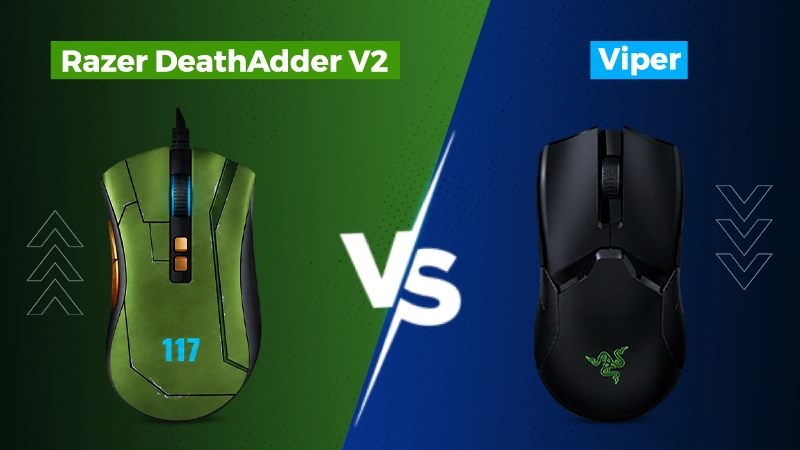
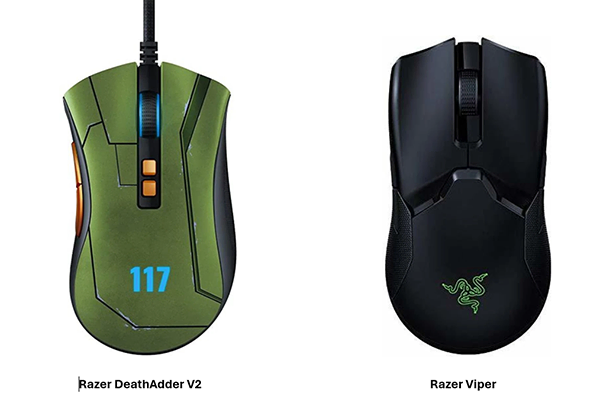
You want to buy a high-tech gaming mouse. But you are confused about which is better: Razer DeathAdder V2 vs Viper. Both have almost similar performance, use optical 0.2 ms click response, and use Speedflex cables. The real difference is shape, weight, and grips. The Viper is lighter and ambidextrous, while the DeathAdder is heavier and for right-handed gamers.
This review helps you choose between the DeathAdder V2 vs Viper gaming mouse.
Top highlights of Razer DeathAdder V2 vs Viper
Viper weighs 74 grams, while DeathAdder V2 weighs 82 grams
Both use Speedflex cable and run on Synapse software
DeathAdder V2 is just for right-handed, whereas Viper is for both hands
Both have Razor optical 0.2 microsecond click response
Viper has 16000 DPI, while DeathAdder V2 has 20000 DPI.
Our Hands-On Take
We have used both mice for over a month for 8-hour shifts and gaming in our leisure time. The Viper gives better comfort and faster flick speed during Valorant. Its lightweight makes it easy for instant movements. If your one hand feels tired, use the other one, as it is designed for both hands.
The DeathAdder V2 is much steadier than the Viper with a little heavy weight. It is perfectly designed for right-handed gamers. It does not fatigue our palms in long hours gaming.
Note: If you are a right-handed gamer with a tight budget, choose the DeathAdder V2. Otherwise, go for the Viper with an ambidextrous shape and wireless feature.
The price of the Razer DeathAdder V2 wired mouse is ₹3,999 on Flipkart. While the price of the Razer Viper wireless mouse is 8,599/-. Neither mouse is currently available on Razer’s official store for Indian buyers. Thus, you can buy them from Amazon or Flipkart.
Note: You had better check the best offers and compare the prices at multiple stores. Prices drop during festive sales; if you want to get more discount, wait for it.
Razer DeathAdder V2 vs Razor Viper Specifications
Check and compare the DeathAdder V2 vs Viper specs first before deciding which one to buy.
Spec
Viper
DeathAdder V2
Buttons
8 programmable
8 programmable
Cable
Razer Speedflex
Razer Speedflex
Click Latency
0.2 ms
0.2 ms
Onboard Profiles
5
5
Resolution accuracy
99.40%
99.60%
Sensor
Razer 5G Optical, 16,000 DPI
Focus+ Optical, 20,000 DPI
Shape
Both hands, low-profile
Right-handed ergonomic
Software
Razer Synapse 3
Razer Synapse 3
Switch Type
2nd-Gen Razer Optical
Razer Optical, 70 million clicks
Weight
74 grams
82 grams
Sensor and Click Performance
The Viper has a 5G sensor, which can have a maximum dots per inch of 16000 with 99.4% accuracy. It is still more than what most gamers prefer to use. As we all know, most high-tech gamers use between 800 and 1600 dots per inch. Therefore, this gap between these two mice is hardly going to make any change in real-world experience.
The DeathAdder V2 and Viper have the same optical switch response of 0.2 microseconds. However, these have different dots per inch capacities. The DeathAdder V2 has a focus and sensor rated to 20000 dots per inch with 99.6% accuracy. It is highly suitable for games that require high-sensitivity settings.
Design and Shape: Ergonomic vs Ambidextrous
The major difference between these mice is not about performance; it is related to shape, size, and grip. According to RTINGS’s testing, both of them have almost the same performance. However, the Viper is perfect for both hands with a slightly flat surface. Whereas the DeathAdder V2 has a curved surface that perfectly fits right-handed gamers.
Therefore, gamers who want better grip for fingertips and claws buy the Viper. As they can use it for both hands equally. Those who prefer stronger palm grips and have medium to large hands buy the DeathAdder V2. Because they find it stable during long hours with its heavier weight.
Weight, Build, and Cable Quality
When it comes to comparing the weights of the Viper 2 and the DeathAdder V2. The weight of the Viper is only 74 grams. This makes this mouse perfect for quicker movements and faster flick speed in shooting games.
The DeathAdder V2 weighs 82 grams. Although it is heavier than the Viper, it is more stable while playing games. You can easily make slow moves perfectly and aim the enemy precisely in shooting games.
The Viper and the DeathAdder V2 have Speedflex cables and PTFE feet. These mice can easily move smoothly on the table with just a slight move.
Software and Customization
Whether the DeathAdder V2 or Viper, both use Razer Synapse 3 software. It is software that is used to change mouse settings. With this software, you can save up to 5 profiles, manage 8 buttons, and control DPI levels.
There is no requirement for cloud storage for these mice. Because Razer Chroma allows you to select almost 16.8 million colors for RGB (red, green, and blue). When you have finished your settings and saved them, you can freely use the mouse without Synapse software.
Pros and Cons of DeathAdder V2 or Viper
Know the strong and weak points of both the Razer Viper vs DeathAdder V2 mice. These may help you know which one fits as per your needs.
Razer DeathAdder V2
Pros
Cons
Has a comfortable grip for the palm, even for large hands.
Only designed for right-handed users
Higher DPI (20000) than Razer Viper.
Heavier than the Razer Viper with 82 grams of weight.
Clicks up to 70 million times.
Has a big size, which fails proper grip for claw and fingertip.
Razer Viper
Pros
Cons
Lightweight body with just 69 grams.
Lacks slightly in wrist support for better palm grip.
Has an ambidextrous shape, perfect for either hand.
Lower dots per inch (16000) than DeathAdder V2.
Faster flick speed to shoot perfectly in games.
Has a slightly flat surface that is less curved.
Which is Worth Buying? Razer DeathAdder V2 vs Viper?
Both the Razer DeathAdder V2 and Viper are unbeatable, as per RTINGS reviews. However, you should buy the DeathAdder V2 for a comfortable palm grip. It is perfect for right-handed gamers who need more DPI for long-hour stability.
Go for the Viper if you need an ambidextrous mouse with better claw and fingertip grips. It has a perfect shape for both hands with faster flick speed.
FAQs
Which is better, DeathAdder V2 or Viper?
Neither of these mice is suitable for all gamers. Because the DeathAdder V2 has a better palm grip. It is perfect for right-handed gamers looking for a stable mouse.
In comparison, the Viper offers better grips for fingertips and claws. It is a better option for gamers who need a lightweight mouse with faster flicker speed.
Which mouse is lighter, the Razer Viper or the Death Adder V2?
The Razer Viper mouse weighs only 74 grams, while the Death Adder V2 weighs 82 grams. It means the Razer Viper is lighter. A lighter mouse comes with better micro-adjustments and faster flicker speed.
Is the Razer Viper mouse compatible for left-handed gamers?
Yes, the Razer Viper mouse is designed with a fully ambidextrous, symmetrical shape and buttons on two sides. This all makes it perfect not only for left-handed gamers but also for right-handed gamers equally.
What DPI (dots per inch) range is perfect for DeathAdder V2 or Viper?
Most gamers use 800 to 1600 DPI no matter what the maximum rating of the sensor. However, the Viper has 16000 DPI, and the DeathAdder V2 has 20000 DPI. But the use of higher dots per inch (DPI) hardly enhances the real-world gaming experience.
Is Synapse software necessary for both Razer DeathAdder V2 and Viper?
No, both of these have settings in onboard memory. Therefore, Synapse 3 is not compulsory for basic use. If you want to use advanced features like Chroma RGB lighting, remapping buttons, DPI editing, and saving profiles, you can install it.